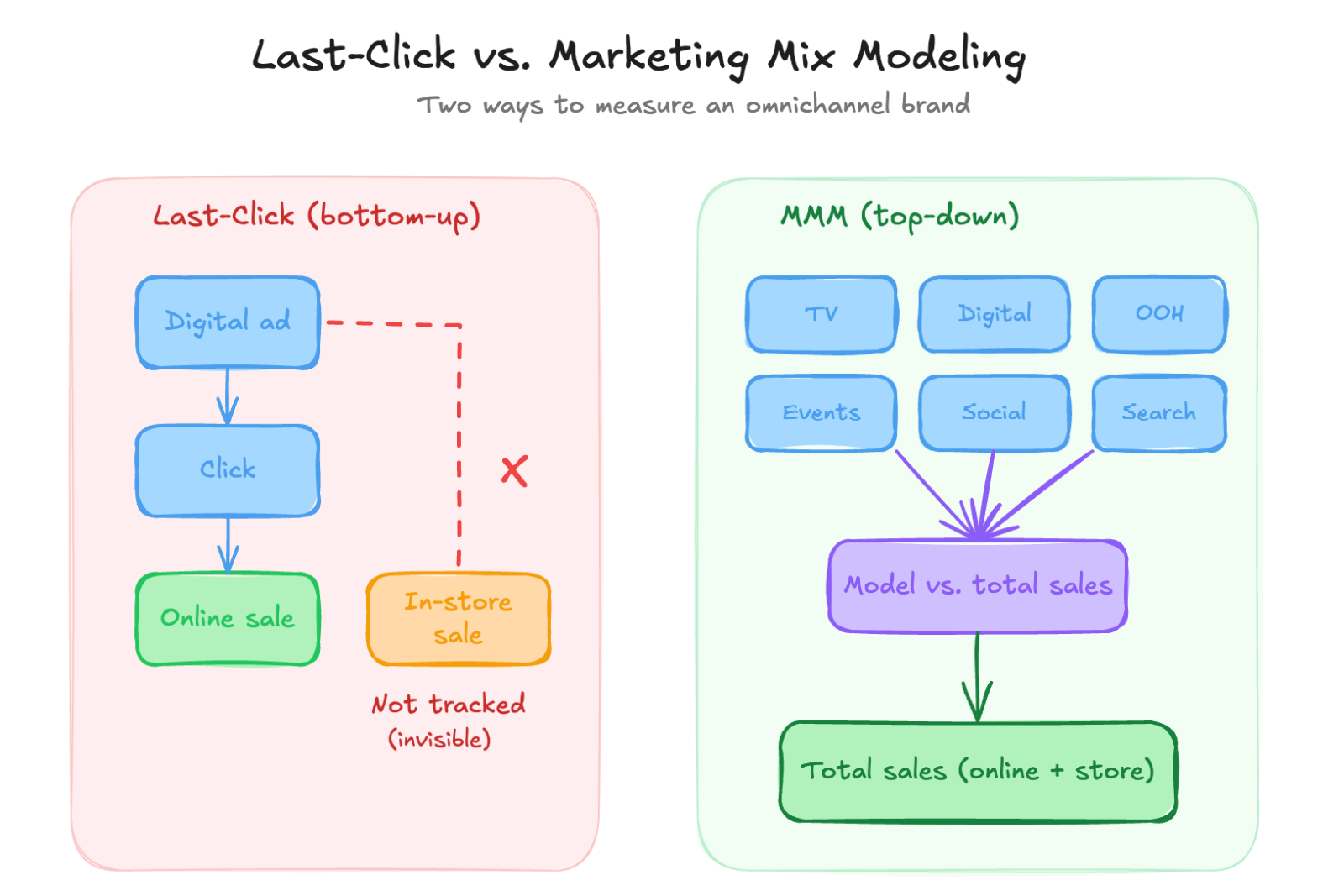
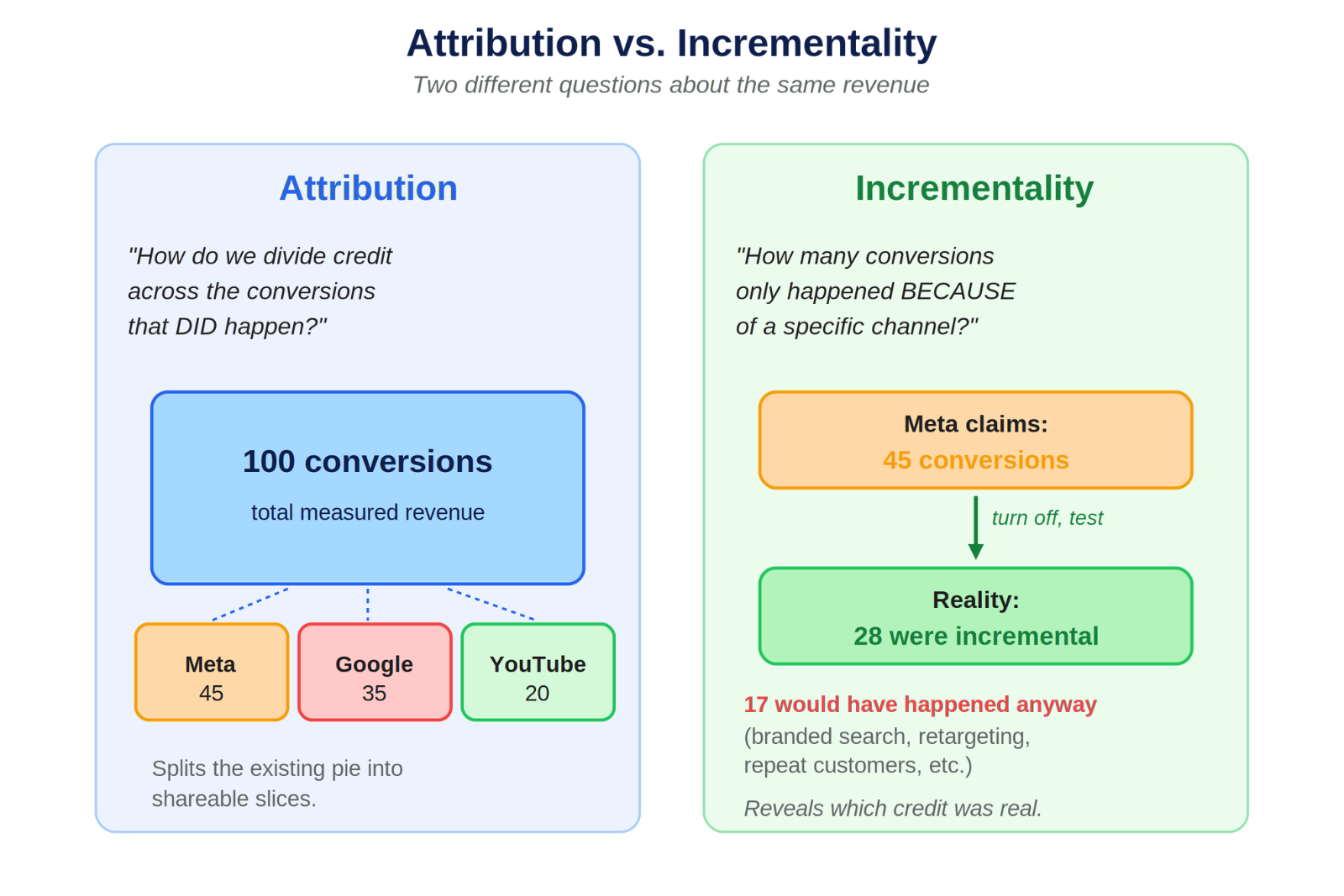
Most brands can tell you how many leads their ads generated last month. Far fewer can tell you how many of those leads turned into deals, or what those deals were worth. That gap is exactly what offline conversion tracking is built to close.
Offline conversion tracking is the practice of capturing conversions that happen away from your website, like a sales rep marking a lead as qualified or a deal as won in your CRM, and feeding that data back into the tools that need it. Done well, it changes the question you can answer from “how many leads did this campaign drive?” to “how much revenue did this campaign drive?”
I get asked about this constantly, usually filed under the broader label of server-side tracking. Here is how I think about it, when it is worth the effort, and where I see teams get stuck.
What offline conversion tracking actually is
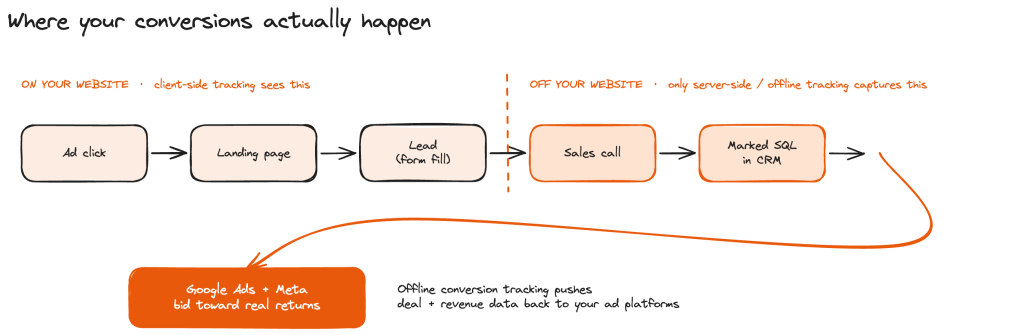
To understand offline conversion tracking, it helps to start with the difference between client-side and server-side data.
Client-side tracking is what the browser can see. It is your Google Analytics tag firing when someone lands on a page or hits a thank-you screen. Server-side tracking is everything that comes from outside the browser, sent directly from your tools through an API. That includes platforms like Shopify and HubSpot, and it includes actions that never touch your website at all.
That last part matters. Some of your most important conversions don’t happen on your site. If a lead comes in, has a call with a salesperson, and that salesperson later marks them as a sales-qualified lead or a closed deal in the CRM, none of that is happening where your GA4 tag lives. It is happening somewhere else entirely, and it is still highly relevant to your advertising.
When client-side tracking is enough, and when it isn’t
For a lot of brands, client-side tracking is enough. If you sell a straightforward product at a consistent price and most conversions happen on the site, GA4 and your ad platforms give you a workable picture. Client-side does leak some data, usually 5 to 15% lost to browser blockers, but that gap is easier to close than it used to be. Native integrations from Shopify and HubSpot get most brands close to 99%, and almost nobody treats GA4 as a source of truth anymore. Most teams read it directionally and move on.
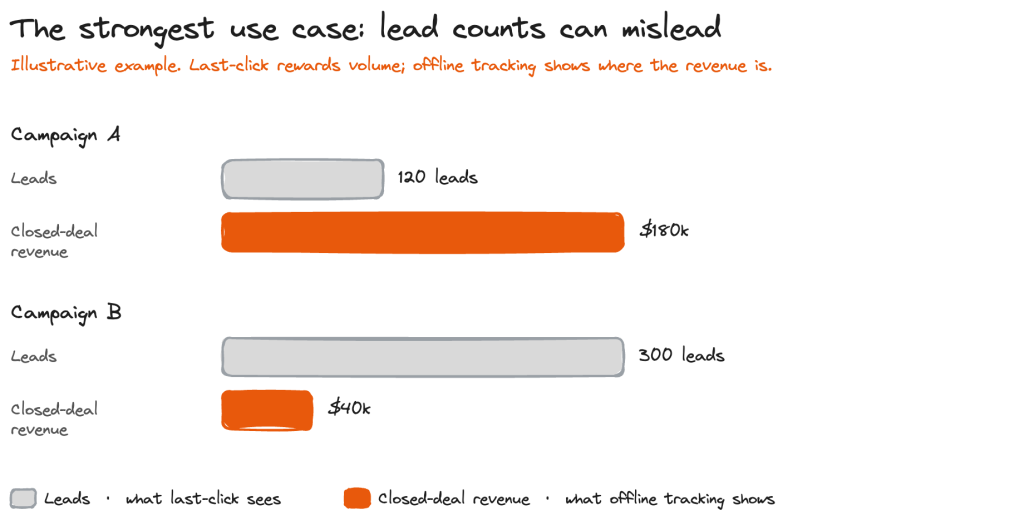
Where client-side tracking falls short is deal-based businesses with variable lead-to-close rates and deal values. If every lead is worth about the same, a count of form fills tells you what you need to know. But when one lead goes nowhere and another becomes a six-figure deal, and that difference only surfaces weeks later in the CRM, on-site tracking is measuring the wrong thing. Qualification, close, and deal size all happen off your website. Your GA4 tag never sees them, so it can’t tell you which campaigns drove revenue.
That gap is what offline conversion tracking closes, and it matters most for deal-based and considered-purchase businesses, not simple, one-price stores.
The strongest offline conversion tracking use case
The biggest “aha” I see these days comes from lead generation campaigns running on Google Ads.
When the data finally comes in, a brand can see not just how many leads a campaign produced, but how many qualified or closed deals it produced, and the value of those deals. Suddenly one campaign that looked mediocre on lead volume turns out to have driven the highest-value deals, while another that generated a pile of leads produced very little revenue.
That is when teams finally see the true return on their campaigns.
Pause: Do you actually need server-side tracking?
The hardest part is usually not technical. Teams misunderstand the goal.
I often see teams fixate on pulling every possible data point into Google Analytics. But the more useful move is frequently the reverse: getting your data out of GA4 and into the systems where decisions actually happen.
One direction is toward your revenue source-of-truth. Push conversion data into your CRM, whether that is HubSpot or something else, or use that tool’s own pixel. Wherever your real revenue and deal data lives, usually Shopify or HubSpot, is where you tend to find the most success.
The other direction is toward the ad platforms, and that is where the real payoff sits today. Porting conversion data straight into Google Ads and Meta lets the platforms bid toward actual returns, instead of sending everything to GA4 for reporting.
So the question is not “how do I get this into GA4?” It is “how do I analyze this out of my CRM or my order management system, or feed it into Google Ads and Meta?”
Offline conversion tracking is not for everyone.
If you have a simple, one-click purchase, one-time transactions, or a model where every lead is worth roughly the same, you probably do not need it. You can usually get enough directional data from GA4 and your ad tools. Building custom tooling just to claw back that last slice of purchase fidelity is overkill, especially now that Shopify makes the standard integration easy.
The other case I would flag is subscription revenue. Pulling follow-on subscription purchases into GA4, not just the initial order, can paint a much richer picture of total revenue. It can also get messy fast. That revenue either shows up unattributed, because it did not happen on the web, or it gets attributed to the point of initial conversion, and untangling that is its own project.
Say a subscriber is acquired from a Facebook ad. The initial conversion might be valued at $100. Six months later, at $100 a month, that same conversion could read as $600. That can be useful, but only if you are ready to be rigorous about how attribution works. Otherwise it creates more confusion than clarity.
Connection to first-party data and cookie changes
Server-side tracking got very trendy around 2021, driven by third-party cookie deprecation and the iOS changes that limited tracking. Piping data in from the back end was the workaround.
It is less trendy now, for two reasons. The tools have gotten much better at automating it. And the ad platforms, Meta especially, have moved toward more predictive models that no longer lean on the cookie the same way. They can now estimate how many conversions a campaign likely drove, and they are usually fairly accurate.
First-party data came out of that same moment. When marketers realized they could not trust attribution as much as they thought, they started paying attention to the data they owned outright: what a customer says in a “how did you hear about us?” field, how they are tagged in the CRM, any signal that reliably indicates where they came from. That data is still valuable, and that has not changed even as the cookie panic has faded.
The setup I recommend
The brands we work with at Flywheel are typically doing $5 to $10 million a year in revenue and want to get to $10 to $50 million. At that stage, the basics are already in place. Conversion tracking is set up, the apps and platforms are working.
The next level is about how you aggregate your data and stitch it together, and where you choose to do server-side tracking versus where you do not.
The most important call is how you aggregate. You have a few options: a data warehouse like BigQuery, an all-in-one platform like HubSpot, an extension of Shopify (which is what a tool like Triple Whale does), or a dedicated aggregation layer. At Flywheel we use Funnel.io to align all the different data sources. Segment is another tool we see used often.
This is what scaling looks like. You end up with more types of data sources, and you need them to line up and agree with each other. My advice is to make a clear, deliberate decision about aggregation as you grow, rather than letting it accumulate by accident.
Frequently asked questions
What is the difference between client-side and server-side tracking?
Client-side tracking captures what happens in the browser, like a pageview or an on-site conversion recorded by your analytics tag. Server-side tracking sends data directly from your tools and databases through an API, including actions that never happen on your website.
How much conversion data does client-side tracking miss?
In our experience, client-side tracking typically misses 5 to 15% of conversions, mostly due to browser blockers. With server-side and offline conversion tracking, most brands can get close to 99% accuracy.
Do I need offline conversion tracking for ecommerce?
Not always. If you sell simple, one-time purchases where every order is similar in value, standard tracking is usually enough. It becomes valuable when you have long sales cycles, variable deal values, or subscription revenue you want to attribute accurately.
Should offline conversions go into Google Analytics or the ad platforms?
For optimizing spend, the bigger win is feeding conversions directly into Google Ads and Meta rather than only into GA4. Getting deal and revenue data into your CRM or order management system also tends to be more useful than trying to make GA4 your source of truth.